
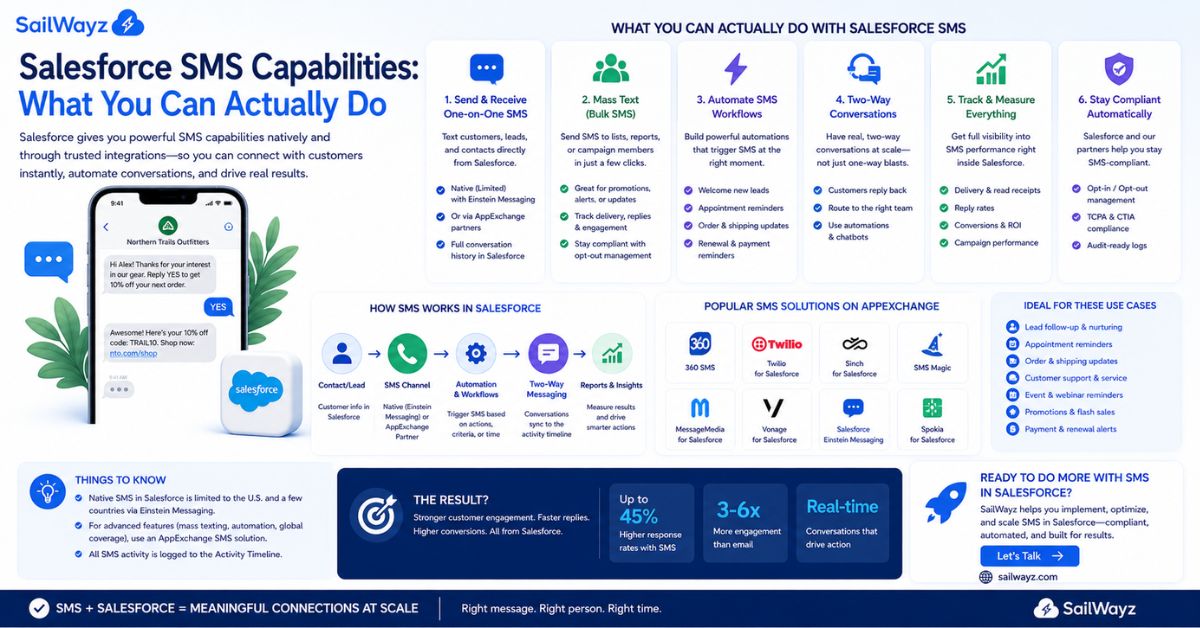
Text messages get read. That is not an opinion. SMS carries an open rate close to 98%, while email sits somewhere between 20 and 30 percent. If your business runs on Salesforce and you have not connected it to a texting channel yet, you are leaving a direct, personal line to your customers unused.
Let’s break it down. This guide covers what Salesforce SMS capabilities actually look like in practice: what the platform can do natively, what you need to add on, how automation works, and what legal rules apply before you send a single message.
Short answer: no. Salesforce Sales Cloud and Service Cloud do not include SMS messaging in their base packages. To send texts from within Salesforce, you need to either purchase an official add-on or connect a third-party app from the AppExchange.
Here is why that matters. Many businesses buy Salesforce expecting a full communication suite. When they discover SMS is not included, they either rely on email alone or start using a disconnected texting tool that does not log conversations to the CRM. Neither option serves your customers or your team well.
The good news: adding SMS to Salesforce is straightforward once you understand your options.
Digital Engagement is a paid add-on for Service Cloud. It. Let’s agents send and receive SMS, WhatsApp, and Facebook Messenger messages from within the Service Console. All conversations are logged automatically and can be routed to the right agent using Salesforce’s omnichannel routing rules.
You can also use Salesforce Flow to automate conversation logic. For example, when a support case is closed, a Flow can automatically send a satisfaction follow-up text without any agent involvement.
Digital engagement works well for support-focused teams. The trade-off: it is built for reactive, one-to-one conversations. It is not designed for bulk marketing campaigns, and pricing can grow significantly as your team and message volume increase.
Marketing Cloud includes MobileConnect, which is Salesforce’s native tool for SMS campaigns at scale. Through Journey Builder, you can set up automated text sequences triggered by customer behavior, such as a welcome message when someone signs up, a cart abandonment reminder, and a loyalty reward notification.
MobileConnect connects with Content Builder for message creation and Einstein for send-time optimization. This path suits enterprises running large, structured marketing campaigns across email, SMS, push notifications, and more, all from one platform.
The cost and setup complexity are higher here. For teams that just need transactional texts or sales follow-ups, Marketing Cloud can be more than what is needed.
This is the most accessible route for most businesses. Dozens of SMS apps are available on the Salesforce AppExchange. They install directly into your org and work with Sales Cloud, Service Cloud, or both, without requiring Marketing Cloud.
Popular options include 360 SMS, Mogli SMS, SMS Magic, and Salesmsg. These apps typically provide two-way messaging, bulk SMS from list views or campaigns, Flow-based automation, message logging to contact and lead records, and built-in compliance tools for opt-in and opt-out tracking.
For small to mid-sized businesses, this path offers the best balance of capability and cost.
Here is a practical breakdown of the Salesforce SMS capabilities available across these methods.
Reps can text a contact or lead directly from their record inside Salesforce. The message is logged to the activity timeline automatically, so the conversation is visible to anyone on the team. No more chasing down texts on personal phones or adding notes manually.
With the right app or Marketing Cloud setup, you can send mass SMS to a campaign list, a filtered list view, or a Salesforce report. You can personalize each message using merge fields pulling in the contact’s first name, account name, or any other field from the record, so a bulk send still reads as a personal message.
This is where Salesforce SMS capabilities move from helpful to genuinely powerful. Using Flow Builder, you can trigger text messages based on any event in Salesforce:
One company that used automated SMS within its Salesforce workflows reported a 20% reduction in demo no-shows after adding text reminders to its pre-call sequence. That kind of result comes from reaching people through a channel they actually check.
SMS is not just for broadcasts. Both Digital Engagement and most AppExchange apps support two-way messaging, meaning your team can have back-and-forth text conversations with customers, all tracked inside Salesforce. Agents see the full conversation history and can pick up where another team member left off without asking the customer to repeat themselves.
You can set up keyword-based responses and chatbot flows that handle common questions without agent involvement. A customer texts “HOURS” and receives your business hours automatically. A support query comes in outside office hours, and an automated reply sets expectations on response times. These flows use Salesforce’s Einstein Bots or Flow-based logic, depending on which product you are using.
Every SMS channel in Salesforce comes with reporting. You can track delivery rates, response rates, message volume by rep or campaign, and opt-out rates. Connecting this data to Salesforce dashboards means your CRM becomes the single source of truth for all customer communication, not just email and calls.
Before you send a single text, you need to understand the legal requirements. Skipping this step is expensive.
In the United States, SMS marketing is governed by the Telephone Consumer Protection Act (TCPA). Violations carry fines of $500 to $1,500 per non-compliant message. A campaign sent to 1,000 contacts without proper consent could result in more than $500,000 in fines. That is not a theoretical risk; TCPA is actively enforced.
The key rules:
Get explicit written consent before sending any promotional SMS. A customer giving you their email address does not count as SMS consent. They need to opt in specifically for text messages, and you need a record of when and how they did so.
Make opting out simple. Every message must include a clear way to stop receiving texts, typically by replying STOP. As of April 2025, businesses must process opt-out requests within 10 business days regardless of how the request arrives.
Register your number. Carriers now require A2P 10DLC (application-to-person 10-digit long code) registration for business texting in the US. This is a formal process where you register your business and campaign type with carriers. Without it, your messages may be filtered or blocked.
In the UK and EU, GDPR applies. If you message contacts in Europe, you need a lawful basis for processing their data and must make withdrawing consent as easy as giving it.
Most AppExchange SMS apps and Salesforce’s own tools include opt-in tracking, consent logging, and opt-out management built in. The legal framework still requires you to configure these correctly.
Setting up SMS in Salesforce is technically straightforward, but getting it right, choosing the correct product, building compliant opt-in flows, and connecting automation to your actual sales process takes experience with both the platform and how businesses actually work.
Sailwayz is a registered Salesforce consulting partner with over 50 combined certifications across the Salesforce product set. The team works with businesses in finance, retail, law, manufacturing, government, and connectivity to build Salesforce environments that do more than manage contacts. That includes integration services, support services, and ongoing Salesforce configuration to keep the platform working as the business changes.
If you are looking at adding SMS to your Salesforce org and want to make sure it is built correctly from the start, Sailwayz can help you choose the right approach, set up the automation, and ensure your consent tracking holds up under scrutiny. Book a free consultation and get a clear picture of where your Salesforce setup stands and what SMS would add.
Next steps: match your use case to the right tool.
For customer service teams that need to manage inbound support requests across SMS, WhatsApp, and chat: Salesforce Digital Engagement gives you a managed, agent-facing console with routing and bot automation.
For marketing teams running structured campaigns with Journey Builder, segmentation, and multichannel coordination, Marketing Cloud MobileConnect is the right fit.
For sales teams and smaller organizations that want to text leads and contacts, automate follow-ups through Flow, and avoid the cost and complexity of full Marketing Cloud, an AppExchange SMS app installed into Sales Cloud or Service Cloud is the most practical option.
Whatever path you choose, the priority is the same: every conversation should be logged in Salesforce, every opt-out should be honored immediately, and your automation should make your team faster, not create more work.
Does Salesforce include SMS messaging in its base plans?
No. Sales Cloud and Service Cloud do not include SMS natively. You need to add Digital Engagement, purchase Marketing Cloud, or install a third-party SMS app from the AppExchange. Most businesses use an AppExchange app for sales and support texting without needing a full Marketing Cloud license.
What is the difference between Salesforce Digital Engagement and Marketing Cloud SMS?
Digital Engagement is a Service Cloud add-on built for one-to-one support conversations via SMS, WhatsApp, and chat. Marketing Cloud SMS (through MobileConnect) is built for large-scale campaigns, automated journeys, and multi-channel marketing. The right choice depends on whether your primary use is support or marketing outreach.
Can I automate SMS messages in Salesforce without coding?
Yes. Salesforce Flow Builder lets you create automated text triggers based on record events, field changes, or scheduled times without writing code. Most AppExchange SMS apps provide native Flow actions that make this setup straightforward for admins.
What compliance rules apply to Salesforce SMS in the United States?
The Telephone Consumer Protection Act (TCPA) governs business SMS in the US. You must obtain explicit written consent before sending promotional texts, include an opt-out option in every message, process opt-out requests within 10 business days, and register your phone number through A2P 10DLC. Violations can cost $500 to $1,500 per message.
How do SMS messages get logged in Salesforce?
When you use Digital Engagement or an integrated AppExchange SMS app, messages are automatically saved to the activity timeline of the relevant contact, lead, case, or account record. This means your whole team can see the conversation history without chasing down individual reps or checking outside tools.

Joshua Eze is the Founder & Salesforce Architect at Sailwayz, a certified Salesforce Consulting Partner based in the UK. With over 6 years of experience leading CRM transformations, he is a certified Application & System Architect passionate about using technology to simplify business processes. Joshua helps companies unlock the full potential of Salesforce with strategic, scalable, and secure solutions.
