
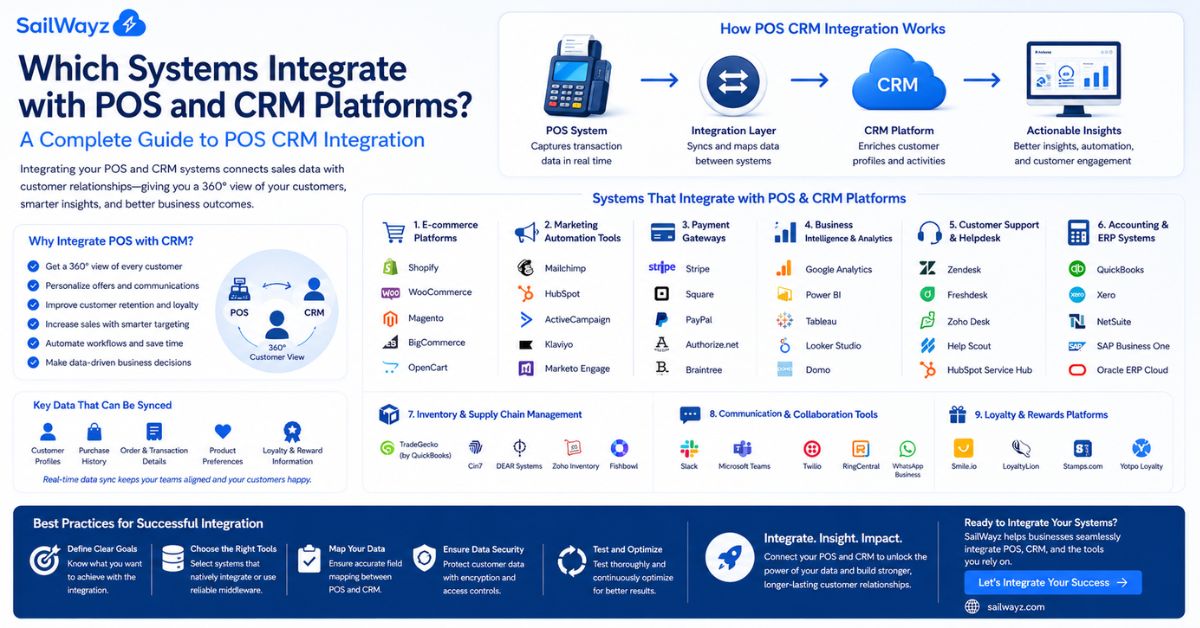
Your point-of-sale system knows every product a customer buys. Your CRM knows every conversation your team has with that same customer. When those two systems talk to each other, you get something neither can deliver alone: a full picture of who your customers are and exactly how they behave.
That is the promise of POS CRM integration. And in 2026, it goes much further than just syncing contact records.
Let’s break it down. Here is a complete look at which systems connect with POS and CRM platforms, what those connections actually do, and how to choose the right setup for your business.
POS CRM integration connects a retailer’s point-of-sale system with its customer relationship management software, creating a unified platform that shares data between the two in real time.
Here is why that matters practically. Your POS handles sales, payments, and inventory. Your CRM stores customer data like contact details, purchase history, and preferences. When these two systems stay disconnected, your team enters the same data twice, customer records fall out of sync, and you miss the patterns that would otherwise tell you who to contact, when, and with what offer.
When they connect, every transaction at the register or online checkout updates customer records, inventory levels, and sales reports automatically. Nothing gets entered twice. Nothing gets missed.
According to a 2024 report cited by Shopify, 85% of mid-market retailers rely on multiple systems to drive growth both online and offline. Data analytics platform Splunk found that 55% of an organization’s data remains untapped, often trapped in disconnected systems. POS CRM integration is the clearest fix for that problem.
Let’s walk through each category of system that connects with POS and CRM, what the connection does, and which platforms lead in each area.
This is the most direct integration and the one that changes day-to-day operations the most.
Integrating CRM with POS software lets businesses build customer profiles by combining transactional data from the POS with relationship data from the CRM. This gives businesses a 360-degree view of customer interactions, purchase history, preferences, and demographic information.
Popular CRM platforms that integrate with POS systems:
What this integration delivers:
Accounting is one of the clearest cases for POS integration. Every sale at the register is a financial event, and without integration, someone has to manually re-enter that data into your books.
An integrated POS system connects point-of-sale functions with accounting systems, automating data flow, reducing manual entry, and improving accuracy across departments.
Popular accounting systems that connect with POS:
What this integration delivers:
When a sale is processed at the register, inventory should update instantly. Without integration, staff checks stock levels in one system while the POS runs in another, creating gaps that lead to overselling, stockouts, and confused customers.
Integrating POS with inventory management provides real-time data updates, which allow for better inventory tracking, error and cost reduction, and more reliable inventory control.
Popular inventory systems that integrate with POS:
What this integration delivers:
Customers move between online and in-store without thinking about which system handles which transaction. Your technology needs to keep up.
According to Deloitte’s 2025 US Retail Outlook, omnichannel shoppers spend 1.5 times more per month than single-channel shoppers. That stat alone makes the case for connecting your online store to your POS.
Popular e-commerce platforms that integrate with POS:
What this integration delivers:
Once POS data flows into your CRM, the next step is putting it to work in your marketing campaigns.
CRM integration with POS software enables businesses to deliver highly personalized customer experiences. With access to customer profiles, businesses can quickly tailor recommendations, reward loyal customers, and run campaigns based on actual purchase behavior rather than guesswork.
Popular marketing platforms that connect with POS and CRM:
What this integration delivers:
Payment processing connects directly to POS operations and feeds data into both accounting and CRM records.
Popular payment processors that integrate with POS:
Enterprise resource planning platforms sit above individual business systems and connect POS, CRM, accounting, inventory, and HR into one database.
POS integration creates a continuous exchange of information that begins the moment a transaction is processed. Everything, including transaction details, payment methods, taxes, discounts, time and date of purchase, and customer identifiers, is captured by the POS and relayed to connected systems.
Popular ERP systems that connect with POS:
Loyalty programs live at the intersection of POS and CRM. The POS tracks when and what a customer buys. The CRM records who they are. Together, they power rewards that feel personal rather than generic.
Modern POS systems with CRM integration typically include a points-based loyalty program for individual customers, making it easy to reward regular customers and build stronger relationships.
Popular loyalty platforms that connect with POS and CRM:
Larger retail operations also connect POS to HR and payroll tools to track staff performance alongside sales data.
How this connection works:
When POS data includes staff IDs tied to each transaction, managers can see which team members generate the most revenue, process the fastest transactions, and handle the most returns. That data feeds into performance reviews and commission calculations.
Popular payroll tools in this space:
Knowing which systems connect is one thing. Understanding how they connect helps you make better decisions about your setup.
There are three main methods:
Here is a practical framework to guide your decision.
Start by mapping your current gaps. Are your teams spending hours reconciling sales data manually? Are customer records in your CRM missing transaction history from the store? Those gaps tell you where integration will give you the most immediate return.
Match the integration method to your technical resources. Small businesses with limited IT capacity do well with native integrations or middleware like Zapier. Larger organizations with complex workflows get more from a properly configured Salesforce environment, especially when a Salesforce consulting partner handles the setup.
Think about your channels. If you sell in-store, online, through a mobile app, and via wholesale, your integration needs to cover all of those touchpoints. A POS-to-CRM connection that only captures in-store transactions leaves your data incomplete.
Test before you go live. Rushing to connect systems without proper testing leads to sync errors and data mismatches. Always run test transactions to confirm that customer records, stock updates, and financial data move correctly before switching on the full integration.
POS CRM integration connects your point-of-sale system with your customer relationship management software so data flows automatically between the two. When a sale is processed at the register, customer records, inventory levels, and financial reports all update in real time. This removes manual data entry, keeps records accurate, and gives your team a full view of every customer without switching between multiple systems.
Salesforce, HubSpot, Zoho CRM, and Freshsales all integrate with major POS platforms. Salesforce offers the deepest capabilities, especially when configured by a specialist partner, because it connects with almost any POS system and lets you build custom data flows that match your specific retail or service workflows. The right choice depends on your team size, budget, and how much customization you need.
Yes. Small businesses often see the fastest results from POS CRM integration because the time savings on manual data entry are immediate. Free or low-cost CRM tiers from HubSpot and affordable platforms like Zoho CRM connect with POS systems, including Square and Shopify POS, giving small teams customer segmentation and automated follow-up without large technology budgets.
The most common data that syncs between POS and CRM includes customer contact details, purchase history, product preferences, average order value, visit frequency, loyalty points, and transaction dates. Some integrations also sync returns, discounts applied, and payment methods. This gives marketing and sales teams accurate customer records without anyone entering data manually.
Simple integrations using native connectors or middleware like Zapier can be set up in a few hours. More complex setups, such as connecting a multi-location retail business to Salesforce with custom deal pipelines and automated reporting, typically take several weeks and benefit from working with a Salesforce consulting partner. The setup time is generally recovered quickly through the time saved on manual processes.

Joshua Eze is the Founder & Salesforce Architect at Sailwayz, a certified Salesforce Consulting Partner based in the UK. With over 6 years of experience leading CRM transformations, he is a certified Application & System Architect passionate about using technology to simplify business processes. Joshua helps companies unlock the full potential of Salesforce with strategic, scalable, and secure solutions.
