
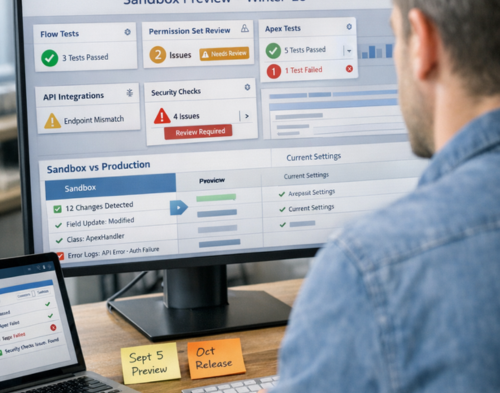
The Salesforce Winter ’26 release introduces significant changes that could disrupt your existing setup if you’re not prepared. Sandbox testing isn’t optional this time. With permission changes, deprecated features, and security updates rolling out between September and October 2025, your two-week preview window starting September 5 is your only chance to catch issues before they hit production.
This guide walks you through exactly what needs testing, why it matters, and how to structure your sandbox testing to avoid disruption.
Sandbox preview begins September 5, giving you just two weeks to test critical features against your customisations before the production release hits. That’s a tight window for what may be one of the most impactful releases in recent years.
Three enforcement waves are planned: September 19, October 3, and October 10, 2025. Your instance will be updated on one of these dates based on your location. The issue? Once these updates go live, several features will be automatically enabled and some legacy behaviours will stop working entirely.
Test new features in a sandbox first to see how they affect your setup, especially if you have custom configurations. This applies to every organisation, but it’s particularly important if you’ve built complex automations, use managed packages, or have custom integrations running on API calls.
The most disruptive updates in Winter ’26 centre on who can run what. If you don’t test these permission changes now, you’ll have users unable to access critical workflows the day after the release.
Only users with the correct access to run flows will be able to do so, which deprecates the FlowSites org permission that gave all users in the org the ability to run any flow. This means every user who needs to run a Flow must now have explicit permission through their profile or a permission set.
Here’s what to test:
The problem isn’t just about access. Some Flows trigger automatically based on record changes. If the running user doesn’t have the right permissions, those automations will fail silently or throw errors.
Apex actions used in Flows will now respect permission rules for built-in file-based classes like ConnectApi, Messaging, and others. Previously, these actions operated under the context of the last component, sometimes allowing users to bypass permission checks.
To test this properly:
A support agent who regularly uses a Flow to log customer issues might suddenly find it broken after Winter ’26. The difference? They weren’t given explicit permission to the Apex class the Flow calls.
Agentforce Service Assistant access will be removed from standard Salesforce licenses in Winter ’26 and will only be available through the Service Planner User permission set license. This isn’t a gradual change. Users who access Service Assistant today will lose access unless you assign the new license.
Test this by:
Winter ’26 tightens security across multiple areas. These aren’t nice-to-have updates; they’re enforced changes that could lock users out or break integrations if you’re not ready.
Users created on or before November 1, 2016, must have a verified email address to send emails from Salesforce, and once this update is enforced, users without verification will lose email-sending capabilities.
Run a query in your sandbox to find affected users:
SELECT Id, Username, Email, EmailEncodingKey
FROM User
WHERE CreatedDate <= 2016-11-01
AND IsActive = true
Contact each user on the list and have them verify their email through the standard Salesforce verification process. Test that they can still send emails after verification.
APIs must use your My Domain host—not instanced URLs like naXX.salesforce.com, with Salesforce enforcing this in sandboxes with Winter ’26 and in all orgs by Spring ’26.
This breaks any integration that hard-codes instance URLs. Check:
In your sandbox, navigate to Setup > My Domain > Redirections and enable “Block API traffic that uses an incorrect instanced URL” to test enforcement before it goes live.
In orgs without Digital Experiences enabled, the default group label becomes “Role and Internal Subordinates” (instead of “Roles and Subordinates”), and any references to the old string in Apex, SOQL, Flows, validation rules, or integrations must be updated.
Use Salesforce DX or Inspector Reloaded to search your metadata for:
Update each reference to “Role and Internal Subordinates” and test thoroughly. A single missed reference could break your sharing rules.
If you use Field Service, Winter ’26 retires features you may depend on. The sandbox is where you discover if your maintenance scheduling is about to break.
Field Service organisations must migrate from deprecated Frequency fields—no exceptions after Winter ’26. The old Frequency and Frequency Type fields on Maintenance Plans are gone.
Testing process:
The complexity here depends on how many maintenance plans you have and how custom your scheduling logic is. Start this testing early because it takes time to get right.
Winter ’26 brings several Flow improvements, but they change how you debug and compare versions. Test these features now so you’re comfortable using them when issues arise in production.
Admins and developers can now directly compare two versions of a flow inside Flow Builder, making it easy to track changes, identify issues before deployment, and share comparison results through generated URLs. This works for autolaunched, scheduled-triggered, platform event-triggered, and record-triggered Flows.
In your sandbox:
The debug interface has been redesigned. Debug panels now dock to the left; plus there’s a unique view for Screen Flows. Test your most complex Flows in debug mode to understand the new layout before you need it to troubleshoot a production issue.
Decision elements now use generative AI to interpret complex, unstructured data and route it appropriately, for example, a flow can analyse the sentiment and key phrases of an incoming customer email and route it as an experienced service representative would.
If you plan to use this feature, test it with real customer data (or realistic synthetic data). The quality of AI routing depends heavily on the quality and structure of your data. Test edge cases and unusual inputs to see how the AI handles them.
If you’re using Agentforce features, Winter ’26 introduces capabilities that need thorough testing before they handle real customer interactions.
Generative AI now provides deep customer understanding by researching and compiling answers to key strategic questions with one click, automatically updating account and account plan fields to accelerate relationship growth, with this feature rolling out starting October 3, 2025.
Test with:
Check whether the AI’s account research aligns with your business needs and whether the automatic field updates follow your data governance rules.
A new Agentforce Metrics dashboard provides insights into agent usage, latency, and errors to help teams plan more realistic tests. Set this up in your sandbox to understand baseline performance before rolling out agents more widely.
Winter ’26 changes how reports and dashboards behave. Test these updates now to avoid surprises when users complain their dashboards look different.
Winter ’26 fixes that by automatically protecting exported data so it comes through exactly as it appears in Salesforce, meaning fewer user complaints and no corrupted exports. Export several reports with complex formulas in your sandbox and verify the data integrity.
When you pulled a report into a dashboard as a Lightning table, you often had to redo groupings or formulas because those settings didn’t carry over—Winter ’26 changes that, as now dashboard tables respect the report settings you’ve already built.
Test by:
Global teams get a big win here, as admins can now translate report and dashboard names, descriptions, and even widget titles. If you support multiple languages, test the translation functionality with your actual use cases.
Your Winter ’26 sandbox testing strategy should follow a structured approach. Random testing won’t catch the issues that matter.
Not every sandbox automatically gets preview access. Check Salesforce’s Sandbox Preview Instructions to confirm that you get preview access by default. If you need to refresh your sandbox, do it before September 4 to enter the preview group.
Focus your limited testing time on:
The calmest admins on release day are the ones who tested their automations and Flows in a sandbox ahead of time, documenting every fix, tweak, and lesson learned, as it’s a small but mighty Salesforce best practice that saves hours when the next release hits.
Create a testing log that includes:
Testing a major Salesforce release properly takes time and expertise. Sailwayz specialises in helping organisations prepare for Salesforce updates without disrupting daily operations. As a registered Salesforce consulting partner, Sailwayz offers sandbox testing services, health checks, and deployment support to ensure your Winter ’26 transition goes smoothly.
If you’re concerned about the permission changes, need help migrating maintenance plans, or want expert guidance on testing complex integrations, Sailwayz can create a customised testing plan for your organisation. The team works with businesses across finance, retail, manufacturing, and other industries to optimise Salesforce implementations and keep systems running during major updates.
Visit Sailwayz to learn more about their Salesforce support services and how they can help with your Winter ’26 preparation.
Once your sandbox testing is complete, you need a deployment plan that minimises risk.
Schedule your deployment outside of core business hours, migrate changes from your sandbox, perform a test run, and validate the impacted functionality to ensure minimal user disruption if a rollback is necessary.
Choose a low-activity time window. Early Saturday morning or Sunday evening works well for most organisations. Have your rollback plan documented and tested before you begin.
Before deploying from the sandbox to production, ensure both environments are synchronised, checking for any references that may not be automatically updated during deployment. If you’ve made changes in production since the last sandbox refresh, those differences could cause deployment failures.
Don’t assume everything works just because the deployment succeeded. Watch for:
The first 24-48 hours after a major release often reveal issues that testing didn’t catch.
You risk broken automations, locked-out users, and failed integrations when the release goes live. The permission changes alone could prevent users from running critical Flows they depend on daily. Production is not the place to discover that your Field Service maintenance scheduling has stopped working or that your API integrations are failing because they use deprecated URLs.
Start as soon as sandbox preview begins on September 5, 2025. You have only two weeks before the first production rollout on September 19. If your organisation has complex customisations or many integrations, you’ll need every day of that window. Waiting until mid-September means you’re testing while production updates are already rolling out to some orgs.
The Flow permission restrictions, role sharing label changes, verified email requirements, and API My Domain enforcement are all mandatory. Field Service maintenance work rules migration is required if you use that functionality. Most Agentforce and Flow Builder enhancements are optional features you can adopt at your own pace. Focus your testing time on the mandatory changes first.
No. Salesforce assigns your org to one of three release waves (September 19, October 3, or October 10) based on your instance location. You can’t opt out or delay. This is why sandbox testing during the preview window is so important. Check your specific release date on Salesforce Trust under the Status tab > Maintenance.
Document the issue immediately with screenshots, error messages, and steps to reproduce it. Fix the issue in your sandbox first, then test the fix thoroughly with different user profiles and scenarios. Once confirmed working, deploy the fix to production before your scheduled Winter ’26 release date. If you can’t solve it yourself, contact Salesforce support or a consulting partner like Sailwayz for assistance.



Joshua Eze is the Founder & Salesforce Architect at Sailwayz, a certified Salesforce Consulting Partner based in the UK. With over 6 years of experience leading CRM transformations, he is a certified Application & System Architect passionate about using technology to simplify business processes. Joshua helps companies unlock the full potential of Salesforce with strategic, scalable, and secure solutions.
