
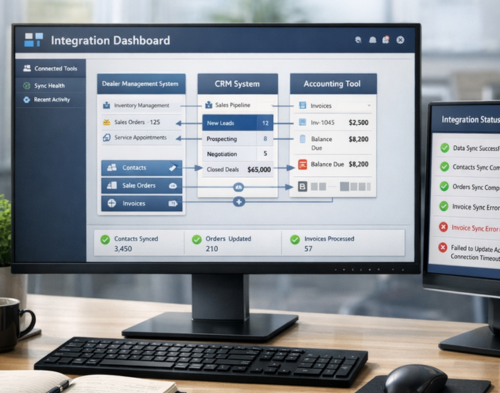
Modern dealerships face a pressing challenge: disconnected software creates data silos, duplicate entries, and countless hours lost to manual processes. The right dealer management system (DMS) can transform operations by connecting customer relationship management and accounting platforms into one seamless workflow.
Choosing dealer systems that integrate best with CRM and accounting tools directly impacts your bottom line. Poor integration leads to errors, delays, and frustrated staff who waste time entering the same information multiple times. Strong integration creates efficiency, accuracy, and better customer experiences.
Let’s break down which dealer systems deliver the strongest integration capabilities and what you should look for when making this critical decision.
Why Integration Between Dealer Systems, CRM, and Accounting Matters
When your dealer management system connects properly with CRM and accounting software, your business runs smoother. Sales teams access customer history instantly. Finance departments close books faster. Managers see real-time reports without chasing down numbers from different platforms.
Integration eliminates manual data entry between systems. Your sales representative closes a deal in the CRM, and that information flows automatically to your accounting system, updating inventory, creating invoices, and recording revenue. This automation reduces human error and frees your team to focus on selling rather than administrative tasks.
Real-time data synchronisation gives you accurate insights. You can track customer interactions, sales performance, inventory levels, and financial health from a single dashboard. This visibility helps you make informed decisions quickly.
Top Dealer Systems with Strong CRM and Accounting Integration
CDK Global Drive
CDK Global offers one of the most comprehensive dealer management systems on the market. The platform integrates natively with major CRM tools including Salesforce, Microsoft Dynamics, and their proprietary CDK Elead CRM solution.
For accounting integration, CDK connects with QuickBooks, Xero, and Sage systems through both native connections and API partnerships. The system automatically syncs sales transactions, updates general ledger entries, and manages accounts receivable without manual intervention.
The platform serves automotive, marine, recreational vehicle, and heavy equipment dealers. CDK’s strength lies in its industry-specific workflows that understand the unique requirements of different dealer types.
DealerSocket
DealerSocket provides strong integration capabilities with a focus on automotive dealerships. The system includes built-in CRM functionality that connects with third-party platforms through open APIs.
The accounting integration supports QuickBooks Desktop and QuickBooks Online, automatically posting sales, processing payments, and reconciling accounts. DealerSocket’s integration handles complex scenarios like trade-ins, financing arrangements, and multiple payment methods.
Users report that the system reduces month-end closing time by 50% through automated reconciliation and reporting features. The platform also integrates with major dealer finance providers, streamlining the entire sales-to-accounting workflow.
Frazer DMS
Frazer Computing offers a dealer management system that appeals to small and medium-sized dealerships through straightforward integration capabilities. The system works with CRM platforms through Zapier connections and direct API integrations.
Frazer connects with QuickBooks Pro, Premier, and Enterprise editions. The integration posts transactions automatically and maintains customer records across both platforms. Setup takes less time compared to enterprise solutions, making it accessible for smaller operations.
The system supports independent automotive dealers, motorcycle dealerships, and equipment sellers. Frazer focuses on practical features that businesses use daily rather than overwhelming users with unnecessary complexity.
Autosoft DMS
Autosoft delivers dealer management software with pre-built integrations for popular CRM and accounting systems. The platform connects with Salesforce, HubSpot, and Zoho CRM through native integrations.
For accounting, Autosoft works with QuickBooks, FreshBooks, and other cloud-based accounting platforms. The system handles inventory management, sales processing, and financial reporting in one unified platform.
Autosoft’s strength lies in its automotive service department integration. The system tracks repairs, parts, labour, and warranty claims while automatically updating accounting records and customer relationship management data.
Lightspeed Dealer Management
Lightspeed provides a modern, cloud-based dealer management system with strong integration capabilities. The platform connects with leading CRM systems including Salesforce, Pipedrive, and Copper.
Accounting integration supports QuickBooks Online, Xero, and MYOB. Lightspeed’s real-time synchronisation ensures that sales, purchases, and inventory changes reflect across all connected platforms immediately.
The system serves automotive, powersports, and marine dealers with a mobile-friendly interface. Lightspeed’s API documentation allows for custom integrations when needed, giving businesses flexibility to connect other tools in their technology stack.
Platforms like Sailwayz recognise the importance of connected systems. Businesses need dealer management solutions that work with their existing tools rather than forcing complete system replacements.
Key Features to Look for in Integrated Dealer Systems
Bi-Directional Data Sync
The best dealer systems push and pull data between CRM and accounting platforms automatically. Changes made in your accounting system should reflect in your CRM and dealer management system without manual updates.
Bi-directional sync prevents data conflicts and ensures everyone works with current information. Sales representatives see updated customer payment status. Finance teams access current sales pipeline data. Inventory reflects across all platforms simultaneously.
Real-Time or Scheduled Synchronisation
Some integrations update data immediately when changes occur. Others sync on a schedule, such as every hour or at the end of each business day.
Real-time sync provides the most current information but requires more system resources and stable internet connectivity. Scheduled sync reduces server load and works better for businesses with limited bandwidth.
Choose based on your operational needs. High-volume dealerships benefit from real-time updates. Smaller operations may find scheduled syncing perfectly adequate.
Automated Workflow Triggers
Strong integrations include workflow automation that triggers actions across platforms. When a sales representative marks a deal as closed in the CRM, the system should automatically create invoices in your accounting software, update inventory, and generate customer welcome emails.
These automated workflows reduce processing time and eliminate steps where errors typically occur. Look for systems that offer customisable triggers that match your specific business processes.
Error Handling and Logging
Integration failures happen. Server outages, network issues, and software updates can interrupt data flow. The best dealer systems include robust error handling that logs failed transactions and allows easy reprocessing.
Your team needs visibility into integration status. Look for systems that provide dashboards showing sync status, error logs, and data validation alerts. This transparency helps you catch and fix problems before they impact operations.
How to Evaluate Dealer System Integrations
Assess Your Current Technology Stack
List every software tool your dealership uses currently. Identify which systems store customer data, process transactions, manage inventory, or generate reports. Your new dealer management system must connect with these tools or provide equivalent functionality.
Don’t overlook niche applications. Payment processors, vendor portals, and industry-specific compliance tools may require integration support that generic dealer systems don’t provide.
Request Integration Demonstrations
Sales presentations often gloss over integration complexity. Ask vendors to demonstrate the actual integration process during your evaluation. Watch them configure connections, sync sample data, and handle error scenarios.
Ask specific questions about data mapping, field synchronisation, and conflict resolution. The demonstration should show real scenarios your business encounters, not just ideal conditions.
Review API Documentation
If you have technical staff or work with IT consultants, review the dealer system’s API documentation. Comprehensive documentation indicates the vendor supports integration and makes resources available for troubleshooting.
Look for active developer communities, frequent updates, and responsive support channels. These indicators suggest the integration will remain stable as platforms evolve.
Calculate Total Cost of Ownership
Integration costs extend beyond initial setup fees. Consider ongoing subscription costs for integration platforms, maintenance fees, and staff training requirements.
Some dealer systems charge per-integration monthly fees. Others bundle integration capabilities in their base pricing. Factor these costs into your budget alongside the primary software licensing fees.
Sailwayz understands that dealerships need clear pricing structures. When evaluating systems, request detailed breakdowns that include all integration-related costs to avoid surprises after signing contracts.
Common Integration Challenges and Solutions
Data Formatting Inconsistencies
Different platforms store information in different formats. Customer names, addresses, and phone numbers may use varying structures that cause sync failures.
Solution: Choose dealer systems that include data transformation tools. These features reformat information automatically to match each platform’s requirements.
Duplicate Records
Poor integration creates duplicate customer records, confusing your team and fragmenting customer history across systems.
Solution: Look for dealer management systems with built-in duplicate detection that matches records using multiple criteria like email addresses, phone numbers, and physical addresses.
Slow Synchronisation Performance
As your data grows, integration performance may degrade. Large dealerships with thousands of customer records face longer sync times that delay access to current information.
Solution: Select systems that use incremental sync technology, updating only changed records rather than processing entire databases. This approach maintains performance as your business grows.
Security and Compliance Concerns
Connecting multiple systems increases security risks. Customer financial data, personal information, and business records move between platforms, creating potential vulnerability points.
Solution: Verify that your dealer system meets industry security standards including encryption for data in transit and at rest. Check for compliance with GDPR, PCI-DSS, and other relevant regulations for your market.
Implementation Best Practices
Plan Your Data Migration
Before connecting new dealer systems with existing CRM and accounting tools, clean your current data. Remove duplicate records, correct formatting errors, and archive obsolete information.
Create a data migration plan that specifies which information transfers to the new system and which gets archived. This planning prevents cluttering your new platform with unnecessary historical data.
Configure Permissions Carefully
Not every staff member needs access to all integrated data. Configure user permissions that restrict access based on job roles.
Sales teams may need CRM access without viewing detailed accounting information. Finance staff require accounting data without necessarily needing full CRM capabilities. Proper permission settings protect sensitive information while maintaining workflow efficiency.
Train Staff Thoroughly
Integration changes how your team works daily. Invest in comprehensive training that covers not just how to use the new system but why the integration improves their work.
Demonstrate specific scenarios relevant to each role. Show sales representatives how customer payment history appears automatically. Walk accounting staff through automated transaction posting. Training investment pays off through faster adoption and fewer support requests.
Monitor Performance Continuously
After going live, monitor integration performance closely for the first few months. Track sync frequency, error rates, and user feedback. Address problems immediately before they become ingrained workarounds.
Schedule regular reviews of your integration setup. As your business evolves, your integration needs may change. Systems that worked perfectly at launch may require adjustment as transaction volumes increase or new products launch.
The Future of Dealer System Integration
Cloud-based dealer management systems continue gaining market share over traditional on-premise solutions. This shift enables more flexible integrations through API connections that don’t require complex server configurations.
Artificial intelligence enters the integration space. Modern systems analyse data patterns to suggest automation opportunities, predict integration failures before they occur, and optimise sync schedules based on usage patterns.
Mobile integration capabilities expand. Sales representatives close deals from tablets during test drives, with information flowing immediately to CRM and accounting systems. Service advisors check parts availability and pricing from mobile devices on the shop floor.
The trend moves toward unified platforms where dealer management, CRM, and accounting exist within single ecosystems. While separate best-of-breed solutions still dominate, integrated platforms reduce integration complexity by keeping everything in one database.
Businesses like Sailwayz stay current with these trends, understanding that dealer operations require flexible, connected systems that adapt to changing market conditions and customer expectations.
Frequently Asked Questions
What is the most important factor when choosing dealer systems for CRM and accounting integration?
Data synchronisation capability stands out as the most critical factor. Your dealer system must push and pull information between platforms reliably, maintaining accuracy across all connected tools. Look for bi-directional sync that updates changes automatically rather than requiring manual intervention. Strong synchronisation prevents the data silos that defeat the purpose of integration.
How long does it typically take to integrate a dealer management system with CRM and accounting software?
Integration timelines vary based on system complexity and data volume. Basic integrations with popular platforms like QuickBooks and Salesforce typically complete within one to two weeks. More complex custom integrations may require four to eight weeks. Factor in additional time for data migration, staff training, and testing before going live with your integrated systems.
Can small dealerships afford integrated dealer management systems?
Yes, many affordable options exist for smaller operations. Cloud-based systems typically offer subscription pricing that scales with your business size. Frazer DMS and similar platforms cater specifically to independent dealers with lower transaction volumes. These systems provide essential integration features without enterprise-level costs, making connected operations accessible to businesses of all sizes.
What happens if my CRM or accounting software updates break the integration?
Reputable dealer management systems maintain their integrations through partner software updates. Most vendors monitor platform changes and update their integration code accordingly. Choose systems with active development teams and strong vendor partnerships. Review the system’s update history and ask about their process for handling third-party platform changes during your evaluation.
Do integrated dealer systems work offline or require constant internet connectivity?
Modern dealer systems increasingly rely on cloud connectivity for real-time integration features. Some platforms offer limited offline functionality that queues transactions for syncing when connectivity returns. If your location has unreliable internet, specifically ask about offline capabilities during your evaluation. Hybrid systems that maintain local databases with cloud sync may suit locations with connectivity challenges better than purely cloud-based solutions.
Recent Posts
-
 Salesforce AI Agents vs Microsoft AI Agents: Which Platform Best Suits Your Business?
 -
 What Is the Difference Between Integrating SAP with Salesforce vs. Other CRMs?
 -
 20 Best Salesforce Consulting Partners for Distribution Companies
 -
 15 Best CRM for Life Insurance Agencies to Boost Productivity and Client Retention
 -
 15 Best CRM for Financial Advisers: A Complete Guide for 2026
 -
 How to Choose Between Salesforce Sales Cloud and Service Cloud for Your Business Needs
 -
 How to Choose a CRM That Integrates with Restaurant POS Systems
 -
 Is Salesforce Feedback Management Included with Agentforce Service? A Complete Guide
 -
 Top 20 Best CRM for Heavy Equipment Dealers in 2026
 -
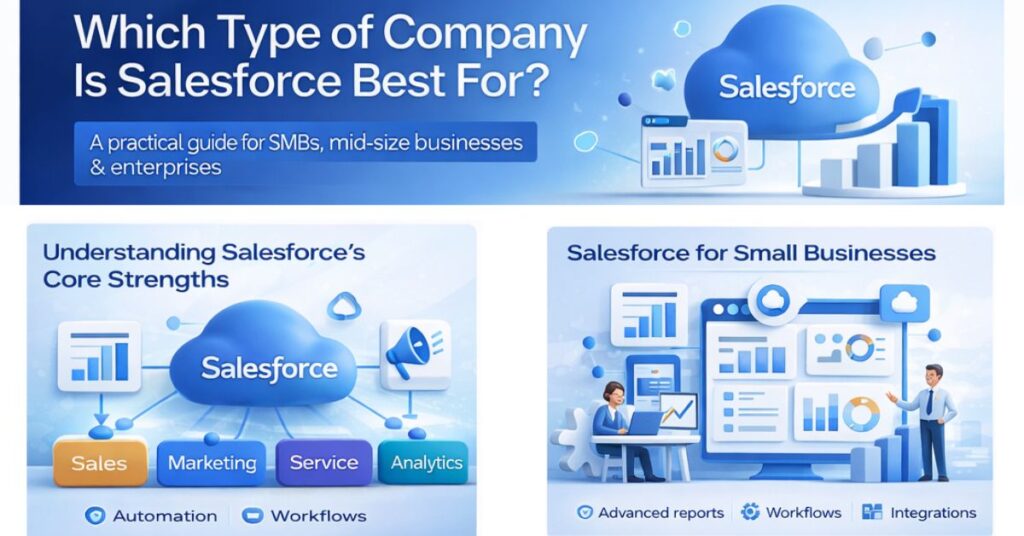 Which Type of Company is Salesforce Best For?

Joshua Eze is the Founder & Salesforce Architect at Sailwayz, a certified Salesforce Consulting Partner based in the UK. With over 6 years of experience leading CRM transformations, he is a certified Application & System Architect passionate about using technology to simplify business processes. Joshua helps companies unlock the full potential of Salesforce with strategic, scalable, and secure solutions.
