
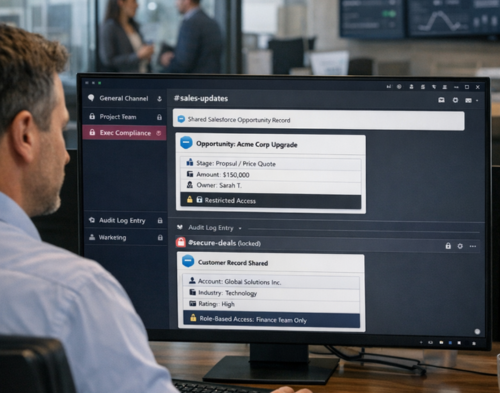
When Salesforce acquired Slack in 2021 for £20.5 billion, it promised to create the world’s most complete customer platform. The union of the number one CRM with a leading collaboration hub seemed straightforward. But three years on, companies are discovering that linking these platforms raises complex questions about data access, security, and compliance.
The stakes are real. According to research by Forrester, integrating Slack with Salesforce can deliver £1.9 million in value from faster deal closure and a 338% return on investment over three years. Yet without proper governance, that same connection can expose customer data, create compliance gaps, and leave your organisation vulnerable.
This guide breaks down how to build a governance framework for Slack Salesforce channels that protects your business whilst enabling seamless collaboration.
Slack Salesforce governance isn’t just about securing a messaging app or locking down a CRM. It’s about managing a bidirectional data flow between two systems with fundamentally different security models.
Salesforce channels in Slack inherit permissions set in Salesforce, meaning people can only view and edit data that they’re allowed to access in the original system. This sounds simple until you consider the reality: a sales representative might have access to account details in Salesforce, but now that same information appears in a Slack channel where guest users, contractors, or external partners could potentially see it.
The challenge becomes even more pronounced with limited access channels. Unlike standard private channels, people can join limited access Salesforce channels without being added if they have access to the corresponding record in Salesforce. This automatic membership model means your governance framework needs to account for dynamic access patterns that shift based on CRM permissions.
Sailwayz works with organisations navigating these exact scenarios. As a certified Salesforce consulting partner, we’ve seen firsthand how poorly configured integrations can create data exposure risks that neither platform anticipated.
Building a governance framework starts with understanding three foundational principles.
Your permissions in Salesforce channels match those set in Salesforce, but that doesn’t mean everything translates perfectly. Record previews, for instance, generate differently depending on where they’re shared. Previews in channels reflect the details when the record was shared using the sharer’s permissions, whilst previews in canvases update based on the viewer’s permissions when they open it.
This creates a governance requirement: you need policies that define which record types can be shared in which channel types, and who can generate those previews.
Slack Salesforce governance requires managing access at multiple levels:
Not all Salesforce data should flow into Slack channels. Your governance framework needs clear rules about which record types, fields, and information categories are appropriate for collaborative discussion.
Sensitive fields like bank account details, national insurance numbers, or health information should typically be restricted from Slack previews. Workspace Owners, Organisation Owners, and Salesforce Admins can limit what details appear in record previews, giving you granular control over data exposure.
The bridge between Slack and Salesforce creates unique identity challenges. Someone might be a full member in Salesforce but only a guest in Slack, or vice versa. Your governance framework needs to address these scenarios.
Integrating Slack with identity providers using SAML-based single sign-on enables consistent application of conditional access, multi-factor authentication, and other identity protections. This creates a single point of authentication control rather than managing credentials separately in each system.
For Sailwayz clients, we typically recommend configuring single sign-on before enabling the Salesforce integration. This ensures every user authenticates through your identity provider first, giving you centralized control over who can access both systems.
System for Cross-domain Identity Management enables automatic user provisioning and deprovisioning, syncing user creation, updates, and deletions directly from your identity provider. This automation is essential for preventing orphaned accounts when someone leaves your organisation.
Your governance policy should define:
Roles such as Primary Owner, Admins, and Workspace Owners should be restrictive and require regular audits. The principle of least privilege applies here: grant people only the access they need to do their work.
Consider creating custom roles that match your business structure rather than relying solely on default permissions. Sailwayz helps organisations design role hierarchies that align with both Slack collaboration patterns and Salesforce security models.
The Slack app ecosystem adds another governance dimension. With thousands of available apps, each requesting various permissions, you need clear policies about what’s allowed.
Preapproving apps reduces administrative overhead whilst maintaining security. Create tiers of approval based on the scopes an app requests:
Always allowed: Low-risk apps that only post messages or provide basic functionality Requires approval: Apps accessing message history, user profiles, or channel data Restricted: Apps with admin scopes or access to sensitive Salesforce data
Workflow Builder can function as a front-end interface where app requests get funnelled to an admin-only channel for approval or decline. This creates a transparent, trackable process rather than relying on ad hoc email requests.
Slack’s integration ecosystem includes thousands of third-party apps, many of which request broad OAuth scopes during installation. Your governance framework should mandate regular audits of installed apps and their permissions.
We recommend quarterly reviews that ask:
In one documented case, an unapproved AI tool gained administrative access to a linked Salesforce instance through a Slack connection, demonstrating the real risks of unmonitored integrations.
The native Salesforce apps for Slack require careful permission management. System Administrators must apply the Slack Standard User permission set for all users who update record data, granting access to Slack actions and notification triggers.
Document which permission sets are required for which integration features. This prevents situations where users can see Salesforce data in Slack but can’t perform expected actions because permissions weren’t configured properly.
Data retention creates some of the trickiest governance challenges for Slack Salesforce integrations. You’re managing retention policies in two systems that need to work together.
Data hosted in Slack uses the retention settings you choose in Slack, whilst data hosted in Salesforce uses Salesforce retention policies. This means a Salesforce record shared in Slack might have one retention schedule whilst the Slack messages discussing it have another.
Your governance framework needs to address this split. For regulated industries, the more restrictive policy typically governs. If Salesforce requires retaining customer communications for seven years but Slack deletes messages after 90 days, you may need to export Slack conversations to a compliant archive before automatic deletion.
There are three levels of message retention settings: conversation-level for individual channels and direct messages, workspace-level for all conversations in a workspace, and organisation-wide across all workspaces in Enterprise Grid.
For Slack Salesforce channels specifically, consider setting retention at the conversation level. This allows you to keep customer-facing channels longer than internal team discussions, aligning retention with the business value and regulatory requirements of each channel’s content.
Once a message retention system is set in place, all messages will be deleted after the specified period and cannot be recovered, so thorough testing in a sandbox environment is essential before rolling out retention policies to production.
Under GDPR, Slack acts as a data processor whilst the organisation using Slack is the data controller. This distinction matters for Slack Salesforce governance because you’re responsible for ensuring personal data shared in channels is collected, stored, and retained according to legal guidelines.
Your governance policy should define:
Even for large organisations, retrieving data necessary to meet GDPR compliance can be painstaking and costly, though automated tools can help. Build these retrieval capabilities before you need them rather than scrambling during an audit.
Sailwayz helps clients implement data governance frameworks that span both platforms, ensuring you can respond to regulatory requirements without disrupting daily operations.
Security governance isn’t just about policies. It requires ongoing monitoring and proactive risk management.
Private channels with limited membership based on the least privilege principle are essential for sensitive information. Public channels aren’t appropriate for customer data, financial information, or strategic discussions.
For Salesforce channels, apply additional restrictions:
Limiting public channels for sensitive departments and using private channels with user groups for access segmentation creates defence in depth.
The Audit Logs API allows security professionals to programmatically check for security lapses. Your governance framework should include regular monitoring of:
For Enterprise Grid customers, treating Slack configurations like infrastructure using tools like Terraform allows you to track changes and enforce policies as code.
Monitoring and data loss prevention solutions can notify compliance professionals when sensitive information like credit card numbers or national insurance numbers is shared over Slack. These tools provide real-time alerting rather than discovering problems during audits.
For Slack Salesforce governance specifically, consider DLP rules that trigger on:
Your governance framework needs incident response procedures that span both platforms. Incident response protocols may include immediately isolating affected channels to prevent further spread, investigating the nature and scope of the breach, and notifying relevant stakeholders.
Define escalation paths before an incident occurs. Who needs to be notified if someone shares restricted Salesforce data in a public channel? What’s the procedure for revoking access if a third-party app is compromised?
Building comprehensive governance doesn’t happen overnight. Here’s a practical approach.
Phase One: Assessment and Planning (Weeks 1-4)
Audit your current state. Document which Salesforce channels exist, who has access, and what data is being shared. Identify gaps between your current practices and compliance requirements. Define governance policies for your organisation, including data classification, access controls, and retention schedules.
Sailwayz typically begins engagements here, conducting thorough audits that reveal hidden risks in existing configurations.
Phase Two: Foundation and Controls (Weeks 5-12)
Implement identity management with single sign-on and provisioning. Configure role-based access controls that align with business needs. Establish retention policies in both Slack and Salesforce. Deploy monitoring and audit log collection.
This phase requires coordination between Salesforce administrators, Slack workspace owners, and security teams. Clear communication about changes helps prevent disruption.
Phase Three: Advanced Security (Weeks 13-20)
Implement data loss prevention rules. Set up third-party app governance and approval workflows. Configure Salesforce channel-specific restrictions. Create incident response playbooks.
Phase Four: Optimisation and Training (Weeks 21-24)
Train users on governance policies and proper channel usage. Document procedures for common scenarios. Schedule regular policy reviews and access audits. Measure compliance and identify areas for improvement.
Governance isn’t a one-time project. It requires ongoing attention as your organisation grows and both platforms evolve.
Quarterly workspace audits should monitor shared activity and detect abnormal behaviour or risky permissions. These reviews catch permission creep before it becomes a security incident.
Focus your quarterly reviews on:
Both Slack and Salesforce release updates that can affect governance. Monitor release notes for:
Update your governance policies accordingly. What worked six months ago might not address new features or risks.
Promoting a culture of verification before clicking on links or downloading attachments reduces social engineering risks. Regular training keeps governance top of mind.
Create channel-specific guidance. For instance, provide clear instructions about when it’s appropriate to share a Salesforce opportunity in Slack versus keeping the discussion within Salesforce itself.
Even organisations with strong governance frameworks encounter challenges. Here are the most common issues we see at Sailwayz and how to prevent them.
Many organisations enable the Salesforce integration without adjusting default permissions. This often results in broader access than intended. Always configure permissions explicitly rather than accepting defaults.
In Enterprise Grid environments, different workspaces sometimes develop their own governance approaches. This creates confusion and security gaps. Establish organisation-wide baseline policies whilst allowing workspace-specific additions that increase security.
Guest users in Slack require special attention. Guests can be added to Salesforce channels but can only participate in conversations in the Messages tab, not access Salesforce data or view records. However, they can still see messages that reference confidential information.
Create clear policies about guest access to integrated channels and train employees on appropriate information sharing.
Record previews seem convenient but can expose sensitive data. Remember that previews in channels reflect details when shared using the sharer’s permissions, potentially showing information to channel members who lack access in Salesforce.
Configure preview restrictions at the field level, hiding sensitive data from Slack whilst keeping it accessible in Salesforce.
Governance for Slack Salesforce channels isn’t optional. As these platforms become more deeply integrated, the risks of misconfigurations, data exposure, and compliance gaps increase. But with a thoughtful framework that addresses permissions, identity, retention, security, and monitoring, you can unlock the collaboration benefits whilst protecting your organisation.
Start with the fundamentals: understand how permissions inherit between systems, implement strong identity controls, and establish clear retention policies. Build from there with monitoring, incident response, and ongoing maintenance.
Remember that governance is a journey, not a destination. As your organisation grows and both platforms evolve, your framework needs to adapt. Regular audits, policy updates, and user training keep your governance effective over time.
Whether you’re just beginning your Slack Salesforce integration or optimising an existing implementation, professional guidance can help you navigate the complexities. Sailwayz specialises in helping organisations build governance frameworks that balance security with productivity, ensuring your collaboration tools strengthen rather than compromise your business.
How do Salesforce channel permissions differ from regular Slack channel permissions?
Salesforce channels use a hybrid permission model where access to conversations follows standard Slack rules whilst access to CRM data follows Salesforce permissions. This means someone might be able to read chat messages but not view the record details in the channel. Your Salesforce access level determines whether you can view or edit data, even if you have full Slack channel access. This dual-layer security requires careful governance to prevent confusion.
What happens to Salesforce data in Slack when someone loses CRM access?
When a user’s Salesforce permissions change or they lose access to a record, they immediately lose the ability to view that data in Slack channels. However, messages they previously sent remain visible. Record previews they can no longer access will show permission errors instead of data. This creates potential compliance issues if historical messages reference now-restricted information, which is why retention policies should account for these scenarios.
Can third-party Slack apps access Salesforce data through integrated channels?
Yes, depending on the OAuth scopes granted during installation. Apps with access to message history can see Salesforce data shared in channels they monitor. This is why app governance is critical for Slack Salesforce integrations. Always review the specific permissions requested by any app before approving it, and restrict apps from accessing channels that contain sensitive Salesforce records.
How should we handle data retention when Slack and Salesforce have different requirements?
The most conservative approach is applying the longer retention period to both systems for integrated data. If regulations require retaining customer communications for seven years, ensure Slack messages discussing Salesforce records follow the same schedule. Consider using eDiscovery tools that capture Slack conversations and store them according to Salesforce retention policies, creating a unified archive that satisfies both compliance frameworks.
What’s the best way to train employees on Slack Salesforce governance?
Start with role-specific training that addresses how different teams use the integration. Sales representatives need different guidance than support agents. Create practical scenarios that demonstrate correct channel usage, appropriate record sharing, and privacy considerations. Reinforce training with in-channel reminders and bots that flag potential policy violations. Schedule refresher sessions quarterly to address new features and evolving threats.

Joshua Eze is the Founder & Salesforce Architect at Sailwayz, a certified Salesforce Consulting Partner based in the UK. With over 6 years of experience leading CRM transformations, he is a certified Application & System Architect passionate about using technology to simplify business processes. Joshua helps companies unlock the full potential of Salesforce with strategic, scalable, and secure solutions.
