
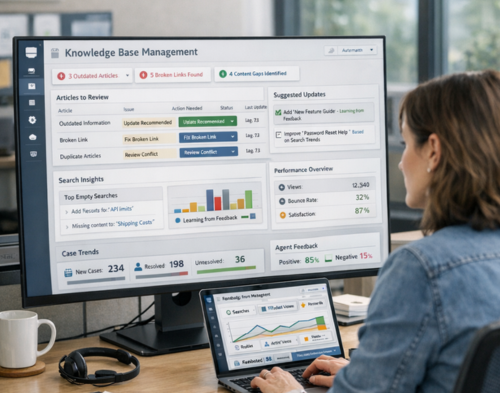
Your knowledge base should work like your best support agent. It should learn from mistakes, spot gaps before they cause problems, and get better every single day. Yet most companies are stuck with static documentation that rots the moment it’s published.
A self-healing knowledge base changes this. It uses AI and automation to detect outdated content, identify missing information, and suggest updates before users even notice something’s wrong. The result? Your team spends less time on manual maintenance and more time helping customers who actually need human support.
Here’s what you need to know about building one that actually works.
A self-healing knowledge base automatically identifies and fixes problems in your documentation. Rather than waiting for someone to notice broken links or outdated screenshots, the system flags issues in real time.
Think of it as preventive medicine for your content. The system monitors how users interact with articles, tracks which searches come up empty, and watches for patterns that signal trouble. When it spots a problem, it either fixes it automatically or alerts the right person to step in.
The core difference from traditional knowledge bases? Regular systems just store information. Self-healing systems actively manage it. They look for duplicate articles, contradictory instructions, and content that hasn’t been touched in months. They learn from user behaviour to surface better answers and suggest new topics worth documenting.
Modern self-healing platforms use machine learning to understand natural language queries. Users can type questions the way they’d ask a colleague, and the system interprets intent rather than just matching keywords. This makes finding answers faster and cuts down on frustrated searches that end with a support ticket.
Manual knowledge base maintenance is a losing battle. Content multiplies faster than any team can review it. Articles go stale, processes change, and nobody remembers to update the documentation until a customer complains.
The numbers tell the story. According to recent industry research, support teams spend more than half their time creating and updating knowledge base content. That leaves little bandwidth to identify gaps or improve existing articles. By the time teams notice outdated information, dozens of customers may have already acted on bad advice.
Duplicate content makes the problem worse. Teams working in silos create overlapping articles with slightly different instructions. Users see conflicting answers and lose trust in the entire knowledge base. The more content you add, the harder it becomes to keep everything consistent.
Search is another pain point. Traditional keyword matching fails when users phrase questions differently than authors wrote answers. A customer searching for “password reset” might miss an article titled “Account Credentials Management.” Every failed search increases the chance they’ll give up and contact support.
The feedback loop is too slow. Most knowledge bases collect ratings or comments, but turning that feedback into action takes weeks. Subject matter experts review suggestions, make changes, go through approval workflows, and finally publish updates. Meanwhile, the problematic content continues causing issues.
AI transforms knowledge management from reactive to proactive. Natural language processing helps systems understand what users are actually asking, even when they use different words than the article authors. Machine learning algorithms spot patterns in search behaviour to predict what content gaps exist.
Content analysis happens automatically. AI scans articles to detect duplication, identify contradictions, and flag outdated information. When product features change or policies update, the system can pinpoint every article that needs revision. This saves hours of manual searching through documentation.
Automated content generation fills gaps quickly. When multiple users search for something that doesn’t exist in your knowledge base, AI can draft a starter article based on related content and support ticket data. Knowledge managers review and refine these suggestions rather than writing from scratch.
The learning loop never stops. Every user interaction trains the system to perform better. When someone searches, reads an article, and then submits a support ticket anyway, the system knows that article didn’t solve the problem. It adjusts rankings, suggests improvements, or flags the content for review.
Sentiment analysis tracks how users feel about content. Beyond simple thumbs up or down ratings, AI can analyse comment text and support ticket language to understand what frustrates users. Articles that consistently generate negative sentiment get priority for updates.
Start with a content audit. Export everything you’ve got and categorise it by topic, age, and usage. Look for obvious duplicates, outdated references, and articles that nobody’s touched in over a year. This baseline helps you measure progress as you implement automation.
Choose tools that fit your tech stack. If your team already uses Salesforce Service Cloud, Lightning Knowledge provides built-in article management with version control and approval workflows. For organisations needing more intelligence, platforms like Bloomfire offer AI-powered content flagging and automatic quality checks.
Set clear ownership rules. Every article needs an owner responsible for keeping it current. Assign subject matter experts to topic areas and give them dashboards showing which content needs attention. Make updates part of their regular workflow, not a quarterly project.
Configure smart alerts. Your system should notify owners when their content shows warning signs low engagement, high bounce rates, failed searches, or negative feedback. Set thresholds that make sense for your volume. High-traffic articles might need weekly reviews while niche topics can wait longer.
Enable user feedback everywhere. Add rating buttons to every article and make it easy to suggest improvements. The best feedback comes immediately after someone reads an article, so don’t hide these options at the bottom of the page.
Build a testing cycle. When the system suggests updates or new content, test them with a small group before rolling out widely. Track whether the changes actually improve user satisfaction and reduce support tickets. This data proves ROI to stakeholders.
Automation doesn’t mean abandoning quality control. Your self-healing knowledge base still needs human oversight to catch nuance that AI misses. Set review schedules based on article importance and change frequency. Critical information gets monthly checks while stable content might only need quarterly reviews.
Create approval workflows for automated suggestions. When AI generates new content or proposes updates, route it through someone with domain expertise. They can verify accuracy, add missing context, and adjust tone to match your brand voice. This balance between speed and quality keeps your knowledge base trustworthy.
Monitor metrics that matter. Track first-contact resolution rates, time to find answers, and the ratio of knowledge base visits to support tickets. These indicators show whether your self-healing system is actually improving user experience or just creating busy work.
Train your team on the new tools. Knowledge managers need to understand how AI makes suggestions so they can evaluate them effectively. Support agents should know how to flag problematic content they encounter while helping customers. Everyone contributes to the healing process.
Document your AI training. Keep records of which suggestions you accept or reject and why. This creates a feedback loop that makes the system smarter over time. It also provides transparency when stakeholders ask how the AI makes decisions.
Customer service teams see immediate benefits from self-healing knowledge bases. When agents can find accurate answers quickly, first-call resolution improves. They spend less time searching multiple systems and more time solving problems.
For companies like Sailwayz that provide Salesforce consulting and CRM implementation, a self-healing knowledge base supports both internal operations and client services. Teams can document best practices, troubleshooting guides, and configuration standards that stay current automatically. Clients accessing support portals get answers that reflect the latest Salesforce releases without manual article updates.
Self-service portals become more effective. Customers searching for help find relevant answers on the first try instead of bouncing between articles. When they can solve problems independently, your support queue shrinks. One Salesforce partner reported that their knowledge base now handles queries that previously required agent involvement.
Onboarding new team members gets easier. Rather than outdated training manuals, new hires access documentation that’s always current. Self-healing systems flag knowledge gaps specific to new user questions, helping organisations build better onboarding content.
Product teams benefit too. When feature launches happen, the knowledge base automatically flags related articles for update. Technical writers get a head start on documentation changes rather than discovering outdated content after customers complain.
Salesforce Lightning Knowledge provides a foundation for building self-healing capabilities. The platform includes article versioning, approval workflows, and feedback collection. You can enable thumbs up and down ratings that help identify problematic content.
Article lifecycle management in Lightning Knowledge supports continuous improvement. Draft, publish, and archive stages keep content organised. Version comparison lets you see exactly what changed between updates. Field history tracking provides an audit trail of modifications.
The Knowledge component integrates directly into Service Cloud consoles. Agents see suggested articles while working cases, making it easy to share accurate information with customers. When they notice errors, they can flag articles for review without leaving their workflow.
Data categories and groups help structure content logically. This organisation makes it easier for both users and AI systems to understand relationships between articles. Well-structured knowledge bases are easier to maintain automatically because the system can identify which articles relate to specific products or topics.
For organisations working with partners like Sailwayz, proper Salesforce Knowledge setup ensures the platform supports self-healing workflows. Custom configurations can add automated content reviews, integration with external AI tools, and reporting dashboards that surface quality metrics.
Track reduction in support tickets over time. If your knowledge base is working, fewer customers should need agent help for common issues. Compare ticket volume by category before and after implementing self-healing features.
Monitor article engagement metrics. Look at views, time on page, and completion rates. Articles that users read through completely and rate positively are working well. Those with high bounce rates need improvement.
Calculate time saved on maintenance. Before automation, how many hours did your team spend reviewing and updating content? After implementing self-healing features, that number should drop significantly. Even if you still employ knowledge managers, they should handle higher content volumes with the same resources.
Measure agent productivity. When support staff spend less time searching for answers, they close more tickets per shift. Track handle time and first-contact resolution before and after knowledge base improvements.
Survey user satisfaction regularly. Ask both customers and internal users whether they can find answers easily and trust the information they receive. Qualitative feedback complements quantitative metrics.
Data quality issues plague the transition to self-healing systems. If your existing knowledge base is messy, AI will struggle to make good suggestions. Plan time for cleanup before enabling automation. Remove obvious duplicates, archive completely outdated content, and standardise formatting.
Integration complexity can slow implementation. Self-healing features often require connecting multiple systems your knowledge base, CRM, support ticketing, and analytics platforms. Work with technical partners to plan these connections carefully.
Change management is harder than technology. Teams comfortable with manual processes may resist AI suggestions at first. Invest in training and demonstrate quick wins to build confidence. Show how automation frees them for more interesting work rather than replacing them.
Over-automation creates new problems. Not every AI suggestion is correct, and blindly accepting recommendations degrades quality. Maintain human oversight for content changes that affect critical processes or compliance-sensitive topics.
Budget for ongoing tuning. Your self-healing knowledge base improves over time, but only if you allocate resources to refine it. Plan quarterly reviews of automation rules, feedback on AI accuracy, and adjustments to thresholds and triggers.
Self-healing knowledge bases are becoming table stakes for competitive service organisations. The companies that adopt these tools first will have cleaner documentation, faster resolution times, and happier customers.
Multimodal content is the next frontier. Knowledge bases won’t just contain text articles. Users will ask questions via voice and receive video explanations or interactive walkthroughs. AI will generate these varied content types automatically based on user preferences.
Predictive content creation will mature. Instead of waiting for users to search for missing information, systems will anticipate needs based on product roadmaps, support trends, and seasonal patterns. Articles will be ready before users look for them.
Personalisation will become standard. Self-healing knowledge bases will adapt content based on user role, experience level, and past behaviour. A new customer sees simplified explanations while a power user gets advanced troubleshooting steps.
The line between knowledge bases and conversational AI will blur. Users won’t distinguish between reading an article and chatting with a bot. Both experiences will draw from the same self-healing knowledge repository.
For service leaders ready to move beyond static documentation, the time to start building is now. Begin with small automation wins flagging outdated content or suggesting duplicate merges. As your team gains confidence and your data improves, expand to more sophisticated self-healing features.
The organisations that wait will find themselves drowning in unmaintained content while competitors serve customers faster with AI-powered knowledge that actually stays current.
What is the main difference between a traditional knowledge base and a self-healing one?
Traditional knowledge bases are passive storage systems that require manual updates and maintenance. Self-healing knowledge bases actively monitor content quality, user behaviour, and search patterns to automatically detect problems and suggest fixes. They use AI to flag outdated articles, identify gaps, and improve content based on user feedback. This proactive approach reduces maintenance burden and keeps information current without constant human intervention.
How does AI detect which knowledge base articles need updating?
AI analyses multiple signals to identify content that needs attention. It tracks article engagement rates, search success patterns, user feedback, and time since last update. When users frequently bounce from an article or search again after reading, the AI flags it as potentially unhelpful. The system also scans for date references, product version mentions, and broken links. Machine learning models compare article performance over time to detect declining usefulness.
Can small businesses benefit from self-healing knowledge bases?
Absolutely. Small businesses often struggle with limited resources for documentation maintenance. Self-healing features automate the busiest parts of knowledge management, making it feasible for smaller teams to maintain professional documentation. Many platforms offer scalable pricing that works for companies of any size. The key is starting simple with basic automation like outdated content alerts before adding more sophisticated AI features as your knowledge base grows.
How long does it take to implement a self-healing knowledge base?
Implementation timelines vary based on your existing content volume and technical infrastructure. Basic setup of AI-powered tools can happen in weeks if you already have organised documentation. The learning period where AI becomes effective typically takes two to three months as the system analyses patterns and gathers training data. Full maturity, where automation handles most maintenance tasks confidently, usually requires six months to a year of continuous refinement.
What role does Salesforce play in self-healing knowledge management?
Salesforce Lightning Knowledge provides the foundation for building self-healing capabilities. It offers article versioning, approval workflows, and feedback collection built into Service Cloud. Companies can extend these features with AI tools that analyse usage data and suggest improvements. For organisations already using Salesforce for CRM and customer service, Lightning Knowledge integrates seamlessly with existing workflows. Partners like Sailwayz help implement and customise Salesforce Knowledge to support self-healing automation.




Joshua Eze is the Founder & Salesforce Architect at Sailwayz, a certified Salesforce Consulting Partner based in the UK. With over 6 years of experience leading CRM transformations, he is a certified Application & System Architect passionate about using technology to simplify business processes. Joshua helps companies unlock the full potential of Salesforce with strategic, scalable, and secure solutions.
