
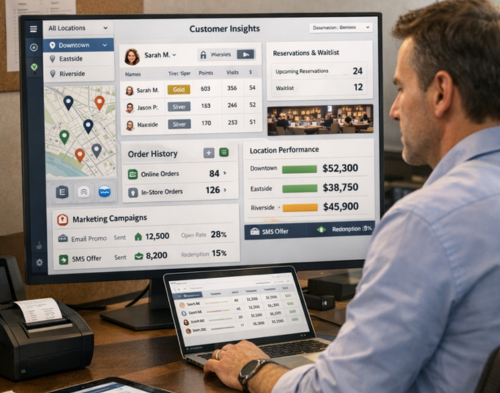
Running a chain restaurant means juggling multiple locations, dozens of staff members, and hundreds (or thousands) of customer interactions daily. Without the right tools, tracking reservations, managing loyalty programmes, and maintaining consistent service quality across locations becomes a nightmare.
A Customer Relationship Management (CRM) platform designed specifically for restaurants can transform how you operate. But with so many options available, which one actually fits the needs of a multi-location restaurant business?
Let’s break down what makes a CRM truly suitable for chain restaurants and which platforms deserve your attention.
Generic CRM systems work well for many industries, but restaurants face unique challenges. You’re not just tracking sales; you’re managing reservations, table turnover, online orders, delivery partnerships, and guest preferences across multiple venues.
A proper restaurant CRM helps you:
The right platform doesn’t just store information. It helps you use that data to create better experiences and drive repeat business.
Before reviewing specific platforms, you need to understand which features actually matter for chain operations.
Your CRM should let you view data across all locations while also drilling down into individual venue performance. You need consolidated reporting without losing the ability to spot location-specific trends.
The best CRM platform for a chain restaurant connects with your existing tools: POS systems, reservation platforms, delivery services, accounting software, and marketing tools. Standalone systems create data silos that defeat the entire purpose.
You need to capture guest information from multiple touchpoints (dine-in, takeaway, online orders, events) and segment customers based on behaviour, preferences, spending patterns, and location visits.
Manual email campaigns don’t scale across multiple locations. Look for platforms that automate personalized messages based on customer actions, such as birthday offers, win-back campaigns for lapsed diners, or special promotions for loyal guests.
For table-service restaurants, integrated reservation systems prevent double-bookings and help manage peak times. The CRM should track no-shows and cancellations to help you optimize table management.
Your platform should provide clear insights into customer lifetime value, average spend per visit, peak dining times, popular menu items, and marketing campaign effectiveness across your chain.
Now for the specific platforms worth considering. These systems have proven track records with multi-location restaurant groups.
For chain restaurants seeking a comprehensive, enterprise-grade solution, Salesforce stands out as the most flexible and powerful CRM platform available. Whilst Salesforce offers unmatched capabilities, the platform’s complexity means you’ll need expert guidance to implement it properly for your restaurant business.
This is where working with a certified Salesforce consulting partner becomes necessary. Sailwayz, a certified Salesforce consulting partner with over 50 combined Salesforce certifications, specialises in helping hospitality businesses implement and optimise Salesforce CRM systems.
Salesforce excels at unifying customer data across your entire chain. When a guest dines at your Brighton location and later orders delivery from your Manchester venue, Salesforce connects those interactions into a single customer profile. This visibility lets you reward loyalty properly and personalise communications regardless of which location the customer visits.
The platform’s Sales Cloud module handles lead management and opportunity tracking if you operate franchise locations or catering services. Service Cloud manages customer enquiries and complaints across channels, ensuring consistent support quality at every location.
What makes Salesforce particularly powerful for restaurants is its deep integration ecosystem. The platform connects with major POS providers, reservation systems, delivery services, and marketing tools. You can track everything from individual transaction details to chain-wide trends without switching between multiple systems.
Here’s the catch: Salesforce requires proper configuration to work effectively for restaurants. The platform is built to serve any industry, which means it needs customisation to handle restaurant-specific workflows like reservation management, menu preferences, dietary restrictions, and multi-location loyalty programmes.
According to Sailwayz, implementing Salesforce for hospitality businesses involves understanding your organisation’s needs, migrating existing customer data cleanly, configuring workflows that match how restaurants actually operate, and training staff to use the system effectively.
Certified Salesforce consultants bridge the gap between Salesforce’s capabilities and your restaurant’s specific needs. Sailwayz takes time to understand your business challenges, designs custom Salesforce solutions for your operations, handles data migration from existing systems, trains your team, and provides ongoing support as your business grows.
For restaurant groups willing to invest in a properly implemented system, Salesforce with expert consulting support delivers the most powerful and scalable CRM solution available.
Toast built its reputation on POS systems and later expanded into CRM functionality. For restaurants already using Toast hardware, their CRM module integrates seamlessly with sales data.
The platform captures guest information at checkout and during online ordering. You can segment customers based on order frequency, average spend, and menu preferences. The email marketing tools are straightforward, letting you send promotions and announcements to specific customer groups.
However, Toast CRM works best for businesses fully committed to the Toast ecosystem. If you use different POS systems at different locations or want more flexibility in your tech stack, the integration limitations might frustrate you.
SevenRooms focuses heavily on the guest experience side of restaurant operations. The platform combines reservation management, table management, and guest profiles into one system.
For upscale chains and restaurant groups that take reservations, SevenRooms provides excellent tools for tracking VIP guests, managing waitlists, and coordinating special events across locations. The guest profiles capture preferences, past visits, and spending history.
The marketing automation isn’t as robust as dedicated platforms, but the reservation intelligence more than compensates if your concept relies on bookings. SevenRooms excels at helping host teams deliver personalized service.
Fishbowl targets fast-casual and quick-service chains. The platform emphasizes guest acquisition through WiFi marketing, online ordering integrations, and loyalty programmes.
The system captures customer data when guests sign up for WiFi, place online orders, or join your loyalty programme. You can then segment and message these customers through automated campaigns.
For chains focused on digital engagement and loyalty rewards, Fishbowl offers solid functionality. The reporting shows which locations drive the most sign-ups and which promotions generate the best response rates.
Upserve, now part of Lightspeed, combines POS functionality with CRM features. The platform tracks customer visits, spending patterns, and item preferences automatically as transactions flow through the POS.
The guest management tools help identify your most valuable customers and target them with special offers. The analytics dashboard provides insights into customer behaviour across your chain.
Like Toast, Upserve works best when you use their complete ecosystem. The CRM features integrate tightly with their POS, but connecting external tools requires more effort.
Selecting a CRM platform isn’t just about features and pricing. Here’s how to make a decision that serves your business long-term.
List every system your restaurants currently use: POS, reservation platforms, delivery integrations, accounting software, payroll systems. Check which CRM platforms integrate natively with these tools. Custom integrations cost time and money, so prioritize platforms that connect easily with your existing setup.
A fine-dining chain has different CRM needs than a quick-service burger concept. Reservation-heavy restaurants benefit from platforms like SevenRooms, while quick-service chains might prefer Fishbowl’s digital engagement tools. Salesforce works well across concepts because of its flexible architecture and comprehensive feature set.
Choose a platform that can grow with your business. If you plan to add locations, enter new markets, or expand your concept, the CRM should handle that growth without requiring a complete system change.
Request demos and trial periods. Have your managers actually use the system for a few weeks if possible. The most feature-rich platform is worthless if your team won’t use it. Pay attention to how intuitive the interface feels and how much training new staff members need.
Don’t just look at monthly subscription fees. Factor in integration costs, training time, ongoing support, and any transaction fees the platform charges. Some “affordable” platforms become expensive once you add necessary features and integrations.
Multi-location businesses need reliable support when issues arise. Check what support channels the vendor offers (phone, email, chat), their response times, and what training resources they provide for new users.
Buying the software is just the beginning. Here’s how to roll out your new CRM without disrupting operations.
Test the system at one or two locations before deploying chain-wide. This lets you work out integration issues, train managers, and refine processes without risking your entire operation.
Before migrating customer information into your new CRM, clean up duplicate records, remove invalid email addresses, and standardize data formats. Starting with clean data prevents headaches later.
Train managers first, then front-of-house staff, then back-of-house teams. Each group needs different levels of system access and knowledge. Create simple guides and quick-reference cards for common tasks.
Define what success looks like before launching. Are you trying to increase repeat visits by 15%? Boost email open rates? Reduce no-shows? Clear metrics help you measure whether the CRM delivers value.
You don’t need to activate every feature immediately. Start with core functionality (customer data collection, basic segmentation, simple campaigns) and add more advanced features as your team becomes comfortable.
Learning from others’ mistakes saves time and money.
The most suitable CRM platform for a chain restaurant depends on your specific concept, existing technology, and business goals. For most multi-location restaurant groups, Salesforce offers the best combination of comprehensive features, ease of use, and true multi-location capabilities built specifically for hospitality businesses.
Whatever platform you choose, remember that a CRM is a tool, not a magic solution. Success comes from consistently collecting quality customer data, analyzing that information, and using insights to create better guest experiences across every location in your chain.
The restaurants that thrive in today’s competitive market are those that truly know their customers and use that knowledge to deliver personalized, memorable experiences. The right CRM platform makes that possible at scale.
What’s the difference between a restaurant CRM and a regular CRM?
Restaurant CRM systems are built specifically for hospitality operations. They integrate with POS systems, reservation platforms, and delivery services, while tracking restaurant-specific data like dining preferences, table turnover, and menu item popularity. General CRM platforms lack these specialized features and integrations that restaurant chains need.
How much does a restaurant CRM typically cost?
Pricing varies widely based on features, number of locations, and transaction volume. Expect to pay anywhere from £50 to £500+ per location monthly. Some platforms charge based on customer records or email sends. Calculate total cost including integrations, training, and support rather than just the base subscription fee.
Can a CRM help reduce no-shows and cancellations?
Yes. Restaurant CRM platforms can send automated reservation reminders via email or SMS, reducing no-show rates significantly. They also track customer no-show history, letting you implement policies for repeat offenders. Some systems allow deposit collection for reservations, which further reduces cancellations.
How long does it take to implement a restaurant CRM?
Implementation timelines depend on your chain’s complexity and existing systems. A simple setup might take 2-4 weeks, while a comprehensive multi-location deployment with extensive integrations could take 2-3 months. Starting with a pilot location speeds up chain-wide rollout by identifying issues early.
What customer data should restaurants collect in their CRM?
Focus on collecting contact information (email, phone), dining frequency, average spend, menu preferences, dietary restrictions, special occasions (birthdays, anniversaries), and feedback or complaints. Track which locations customers visit and whether they prefer dine-in, takeaway, or delivery. This data powers personalized marketing and service improvements.

Joshua Eze is the Founder & Salesforce Architect at Sailwayz, a certified Salesforce Consulting Partner based in the UK. With over 6 years of experience leading CRM transformations, he is a certified Application & System Architect passionate about using technology to simplify business processes. Joshua helps companies unlock the full potential of Salesforce with strategic, scalable, and secure solutions.
